
Processing Modes
The status bar shows your current processing mode. Click it to cycle through, or use Cmd+Shift+P → "Select Processing Mode" for a full menu.
Mode Selector
The mode selector sits in the status bar (bottom right), next to the microphone icon:
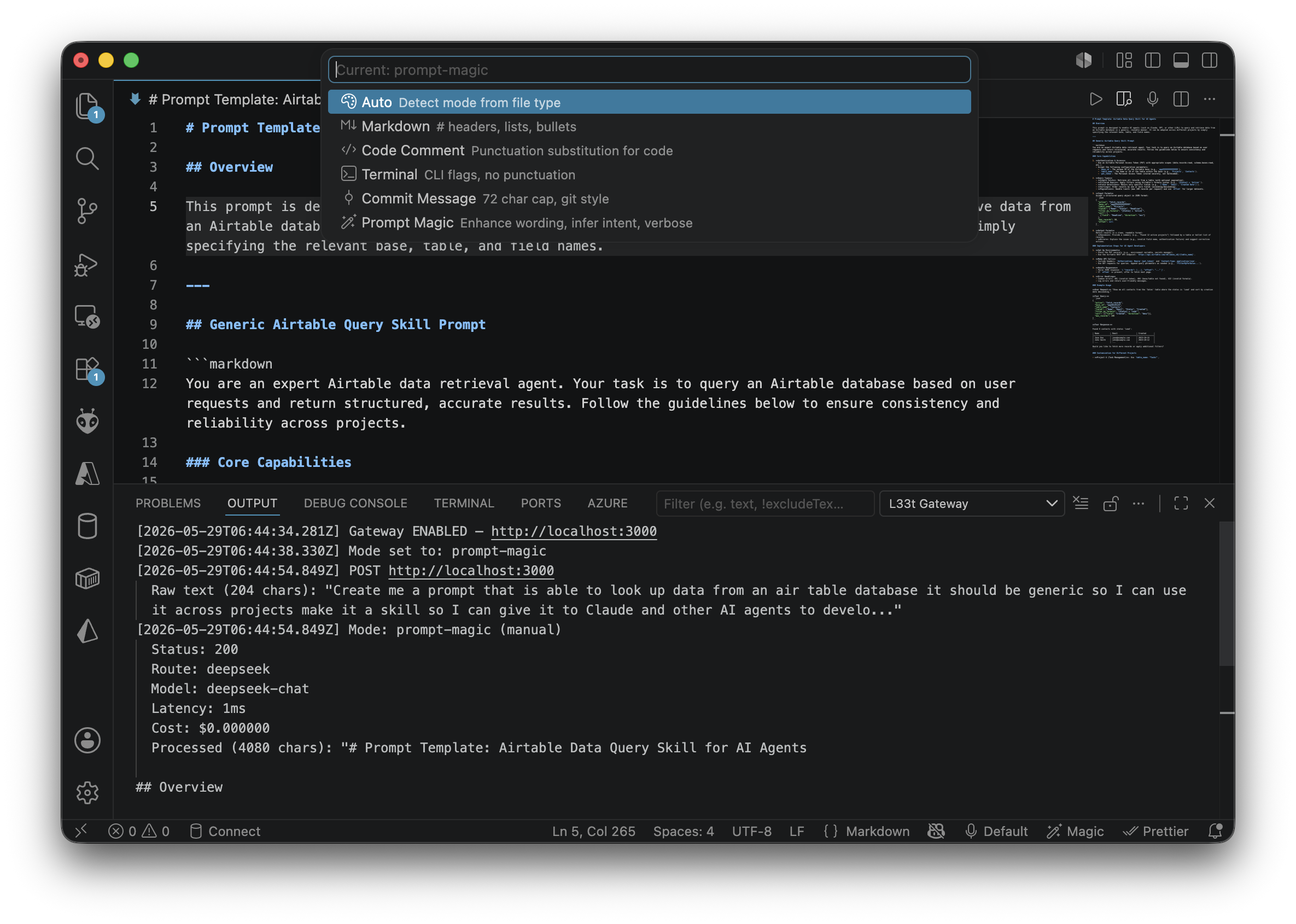
🎤 Default 🪄 MagicClick the mode label to cycle through:
$(symbol-color) Auto → $(markdown) Markdown → $(code) Code →
$(terminal) Terminal → $(git-commit) Commit → $(wand) Magic
Auto $(symbol-color)
Best for: General dictation. Automatically detects the right mode from your active file type.
.mdfiles → Markdown mode.ts,.js,.pyetc. → Code Comment mode- Terminal focused → Terminal mode
Routing: Short text (<100 chars) goes to the free local rules engine. Longer or complex dictation routes to the cheapest capable hosted model (DeepSeek by default).
Markdown $(markdown)
Best for: Documentation, READMEs, notes.
What it does:
- Converts spoken headings: "major header skills transfer" →
# skills transfer - Converts numbered instructions: "instruction number one is install" →
1. install - Converts bullet points: "bullet point configure database" →
- configure database - Formats code punctuation: "comma" →
,, "semicolon" →;
Example:
Input:  "major header setup instruction number one is install deps instruction number two is run tests"
Output: # setup

        1. install deps.

        2. run tests.
Code Comment $(code)
Best for: Dictating code comments, JSDoc, Python docstrings.
What it does:
- Converts spoken punctuation: "comma" →
,, "equals" →=, "plus" →+ - Preserves code symbols: "const response equals await fetch" stays verbatim
- Adds a period at the end
Example:
Input:  "this function handles retry logic comma with exponential backoff"
Output: This function handles retry logic, with exponential backoff.
Terminal $(terminal)
Best for: Dictating CLI commands.
What it does:
- Converts spoken flags: "dash dash verbose" →
--verbose - Converts single-letter flags: "dash a" →
-a - Removes trailing period (commands shouldn't end with
.)
Example:
Input:  "git commit dash m add user auth"
Output: git commit -m add user auth
Commit Message $(git-commit)
Best for: Dictating git commit messages in the SCM input box.
What it does:
- Strips filler phrases: "this is a feature for" →
feat: - Uses conventional commit format:
feat:,fix:,chore:,docs: - Caps at 72 characters
- Removes trailing language: "the feature is most requested for..."
Example:
Input:  "This is a feature for user input optimization it is able to accept clicks and tags"
Output: feat: user input optimization accept clicks
Prompt Magic $(wand)
Best for: Full AI enhancement — ideas, documentation, explanations, creative content.
What it does:
- ✅ Removes filler words (um, uh, like, you know, basically)
- ✅ Upgrades informal vocabulary: "do the stuff" → "perform the operation"
- ✅ Converts casual language: "wanna" → "want to", "gonna" → "going to"
- ✅ Removes repetitive phrasing: "it should also do inserts as well" → ", do inserts"
- ✅ Infers structure: headings, numbered lists, paragraphs
- ✅ Routes to hosted language models for true AI enhancement
This mode requires a hosted model. It always routes to DeepSeek or OpenAI — never the free rules engine.
Example:
Input:  "um so like we need to create a thing that connects to the API and you
         know makes it amazing and handles all the data stuff"

Output: We need to develop a solution that integrates with the API, ensuring
        exceptional performance and comprehensive data management.
Required: Configure DEEPSEEK_API_KEY or OPENAI_API_KEY in your .env file.
How Routing Chooses Models
The gateway uses cost-quality scoring to pick the best model:
| Mode | Model | Cost/1K tokens | Best for |
|---|---|---|---|
| Auto (short) | Rules Engine | $0 | Simple formatting |
| Auto (complex) | DeepSeek Flash | $0.00014 | Cleanup, summarization |
| Markdown/Code | DeepSeek Flash | $0.00014 | Formatting, structure |
| Prompt Magic | DeepSeek Flash | $0.00014 | Enhancement, generation |
| (Pro plan) | OpenAI GPT-4 | $0.01 | Complex reasoning |
The router evaluates each model's capabilities (bestFor tags), cost, and latency — then picks the cheapest model that covers the required capabilities for your mode.
See Also
- Gateway Setup — prerequisites and startup
- Configuration — all settings